TaskPerfect 12
What's new in TaskPerfect 12
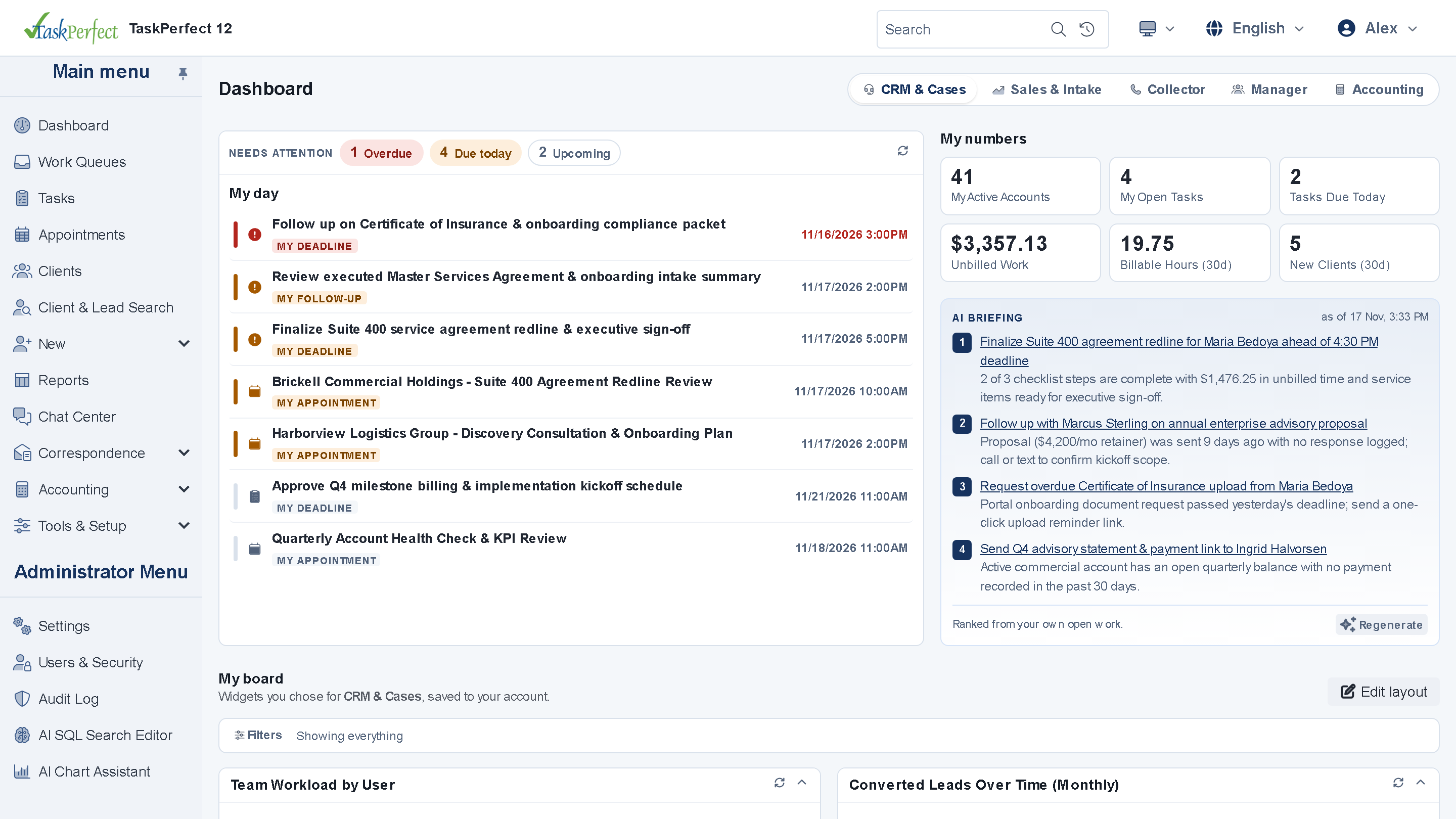
Version 12 brings TaskPerfect to the browser. Staff, attorneys, managers and clients share one phone-friendly web app for daily CRM, case tracking, time entry and payments, while the Windows application keeps the back-office accounting it already runs well.
- One .NET 8 web app for staff & clients
- Ranked queues, timers & billing approval
- Payment links, QR codes & Gemini AI
The new web app
Your daily operation in one browser window
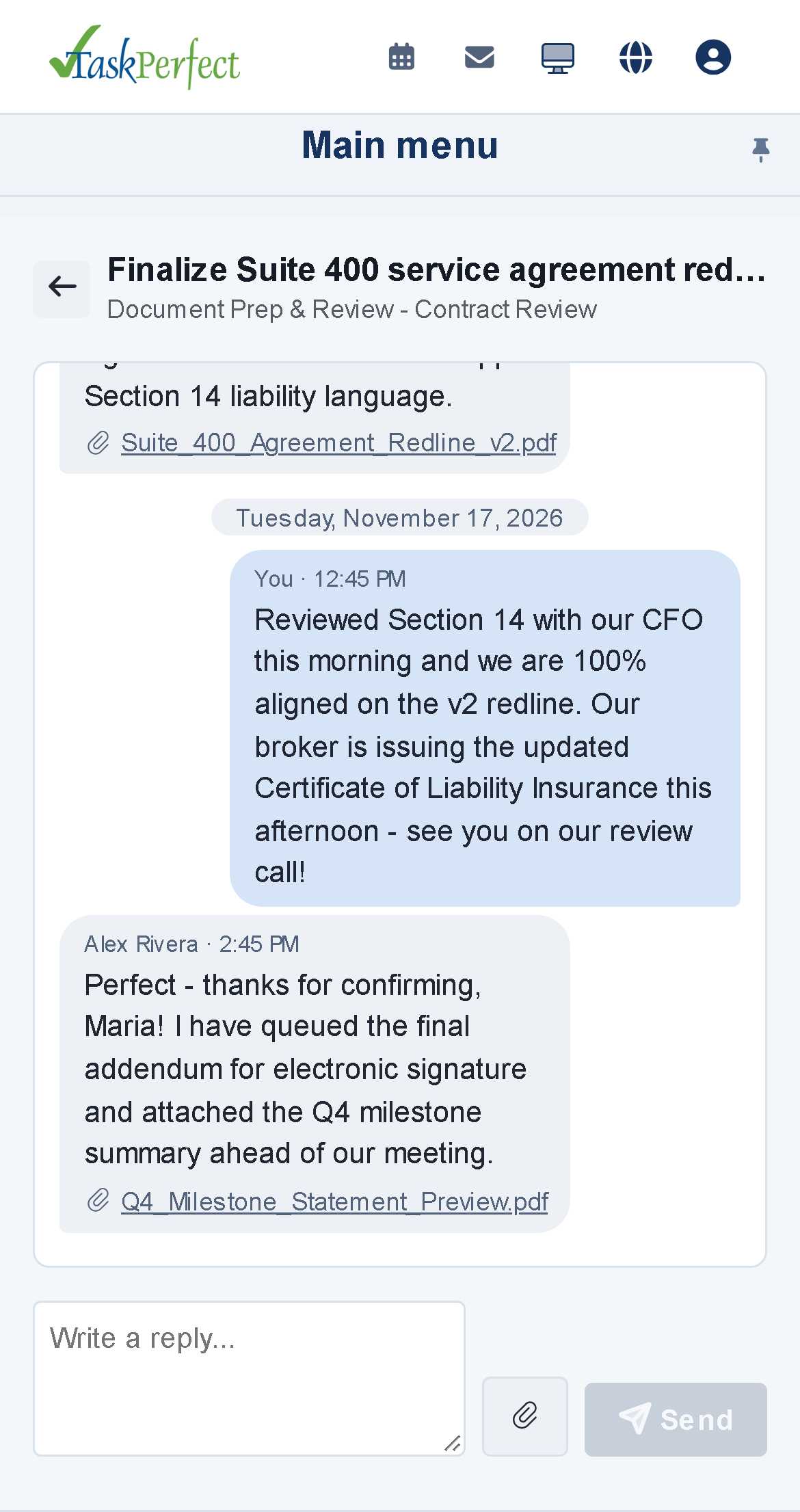
Staff, managers and external clients sign in to the same ASP.NET Core (.NET 8) web application, each seeing only what their role allows. Screens adapt automatically to phones and tablets—switching wide grids into touch-friendly cards—in light or dark mode.
TaskPerfect 12 is a hybrid by design: the included Windows application remains available for back-office accounting and batch administration, and each release moves more of it to the web.
The web app
- One app for staff and clientsInternal teams, managers and external portal users sign in to one unified .NET 8 web application.
- Phone-friendly responsive UIWorks in any phone or tablet browser; data grids automatically switch to clean card layouts on phones.
- Light and dark themesEach user selects Light, Dark or system-automatic mode with full WCAG contrast.
- Global Quick Search & CSV exportJump straight to any contact, company, case or task, and export customizable grids to CSV where permitted.
- Web Settings ExplorerSearch hundreds of configuration settings by keyword or field name in the browser, with live Site Reset.
- Hybrid by design Windows appKeep using the included Windows application for trust bank reconciliation, invoice runs and QuickBooks exports.
CRM, cases, tasks & work queues
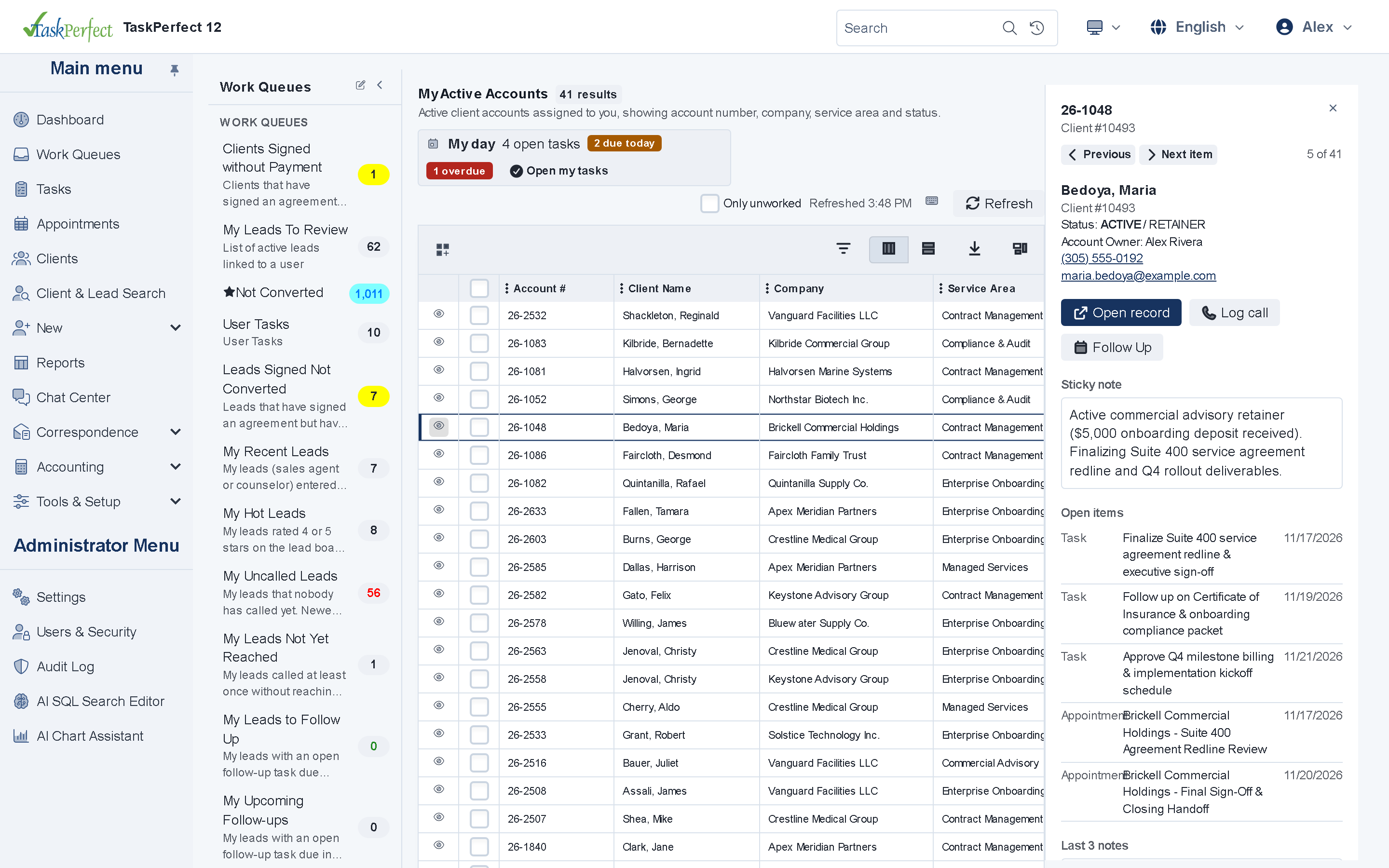
- Priority-ranked Work & Task QueuesOpen the next highest-priority case or task, complete your action and advance without returning to the list.
- Triage DrawerPreview record details, sticky notes and the last three notes, log a call or snooze follow-up with keyboard shortcuts.
- Queue SupervisionManagers monitor queue backlogs, bulk-reassign ownership, auto-distribute work and review the assignment audit trail.
- Unified Interaction TimelineView calls, emails, texts, portal messages and notes in one chronological feed—as a tab or side-by-side right rail.
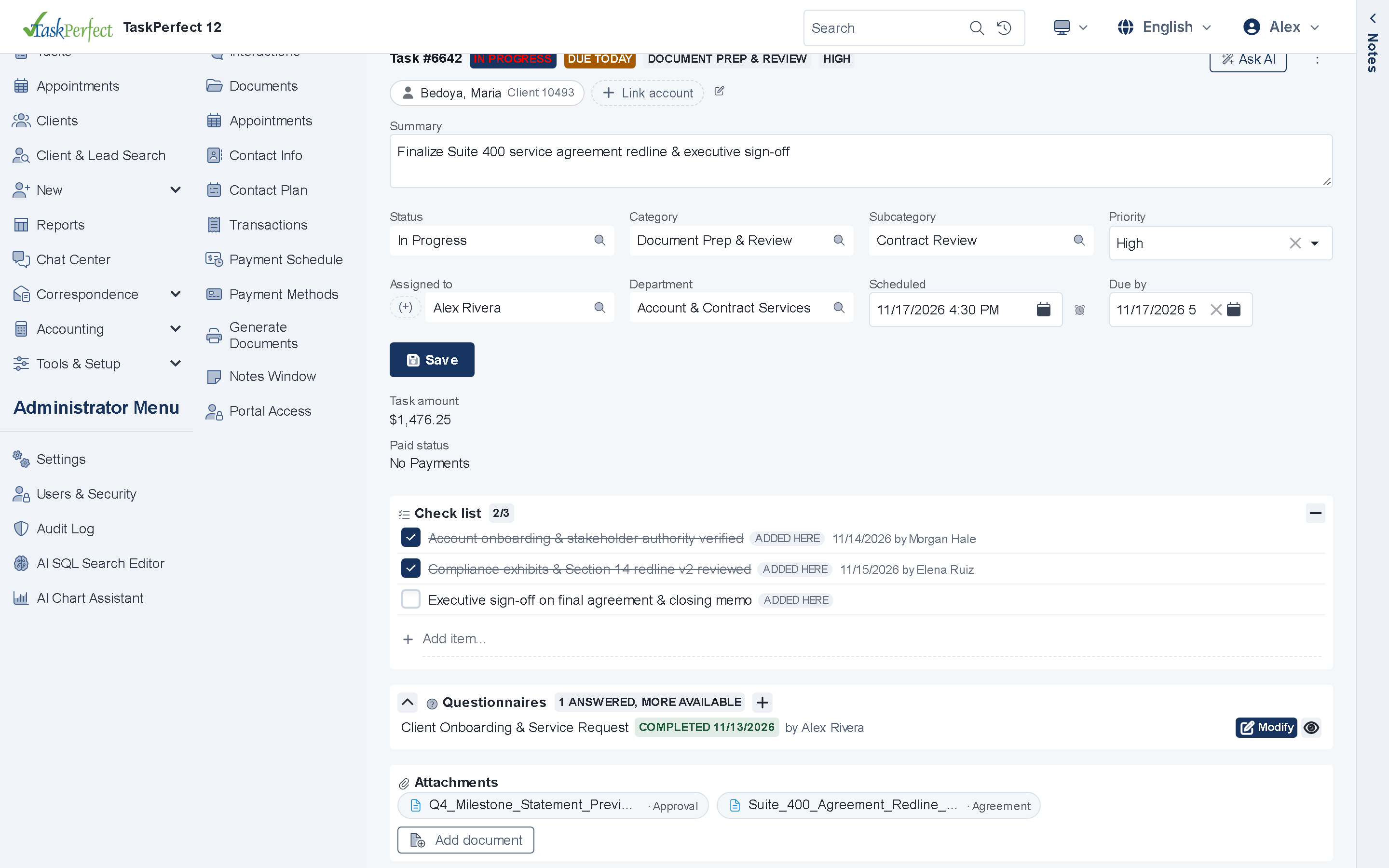
- Checklists, Questionnaires & CollaboratorsAttach interactive step checklists (with close gates and ad-hoc items), structured questionnaires and co-owners to tasks.
- Contact Plans & status documentsSchedule structured follow-up sequences and automatically generate or send templates when a task status changes.
- Click-to-call with Intermedia UnitePlace calls from any record in the browser, see incoming caller cards, and enforce do-not-call and calling-hour blocks.
Time-tracking, billing & payments
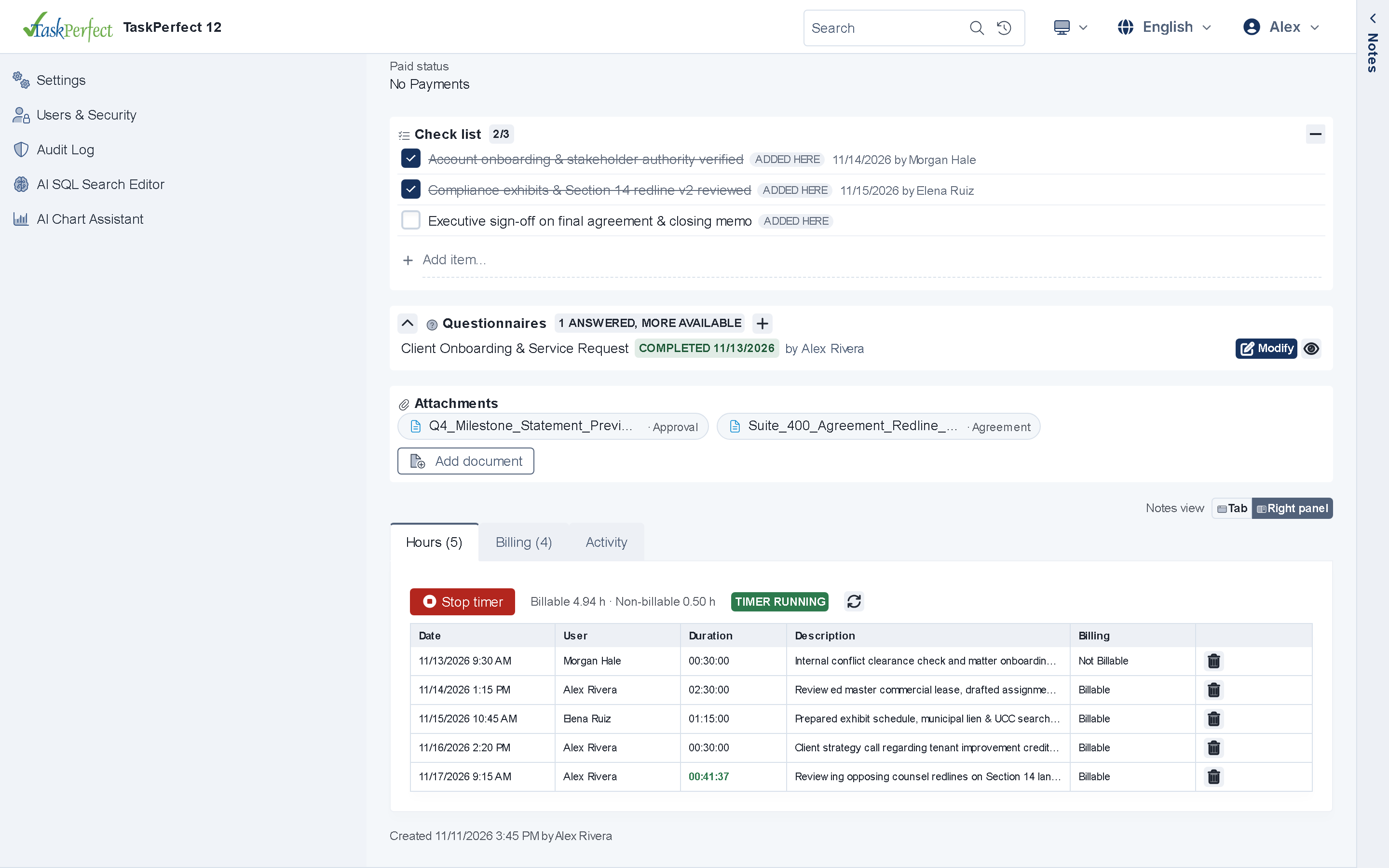
- Web Task Hours & timersRun start/stop timers in the browser, compare estimated vs. actual billable and non-billable hours, and flag over-budget work.
- Billable Items & Billing ApprovalRecord hourly and fixed-fee items on tasks, require optional manager approval before invoicing, and lock billed entries.
- No-login Pay Now pageClients can pay open balances online from a secure token without creating or remembering a portal password.
- Payment links by email or SMSSend a one-tap link from any record or template that opens the client's exact balance ready to pay.
- QR codes on Word invoices & lettersEmbed scannable payment QR codes directly inside Microsoft Word (
.docx) invoice and letter templates. - 8-digit Pay-by-Phone codeGenerate a 10-minute numeric code during a live phone call so clients can complete payment immediately on their phone.
- Authorize.Net, NMI & CloverVerify cards with the processor on save, manage installment schedules in the browser, and run Card & NACHA ACH batches with a LIVE/TEST banner.
- Invoice runs & trust reconciliation Windows appBatch client invoice generation, QuickBooks exports and QuickBooks-style trust bank reconciliation run in the Windows back office.
Client web portal
- Clean Customer Task ViewClients track the cases and tasks you share—and mark assigned action items done when permitted—without seeing internal notes.
- Online e-signature with ICCOSignBuilt-in ICCOSign includes 1,000 free signatures per month in your portal (using your signing certificate); DocuSign and SignNow are also supported.
- Balances, receipts & saved methodsClients review payment history, pay open balances and manage saved cards or bank accounts online.
- 50-file drag-and-drop uploadsClients upload requested records directly to their case folder, firing instant workflow alerts to assigned staff.
- "How did we do?" feedbackCapture a quick satisfaction rating and comment right after a support ticket, task or live chat closes.
- Passwordless Contact PreferencesClients choose their email and SMS preferences from a tokenized link without needing to log in.
Communications
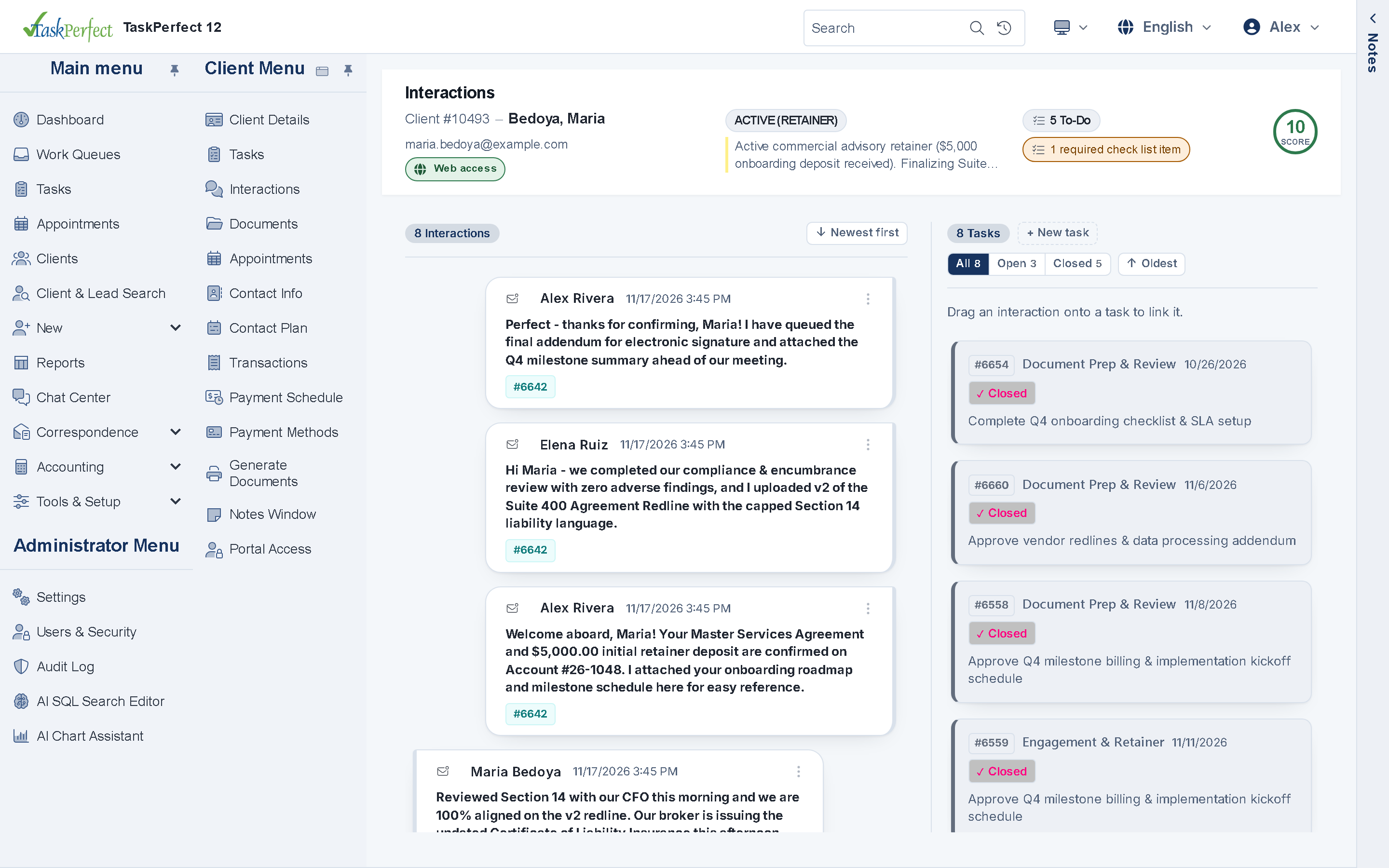
- Word, HTML & SMS from one engineManage print letters, rich HTML emails and text templates from one shared merge-field library.
- Email open & link trackingSend through SendGrid or Microsoft 365 OAuth and see delivery status, opens and clicked links on the record.
- Two-way SMS via MessageMediaInbound replies land on the client timeline automatically, with built-in
STOPopt-out enforcement. - Web Live Chat CenterChat with portal visitors in real time from the browser, with optional email verification codes for unauthenticated guests.
AI with Google Gemini
- Private Vertex AI connectionRuns through Google Gemini on Vertex AI in your own Google Cloud project—off by default and strictly advisory.
- Next-step suggestionsGet a grounded next-action recommendation on open cases and accounts citing the underlying notes and history.
- Daily briefingStart the morning with an AI summary of what changed overnight and which items need attention first.
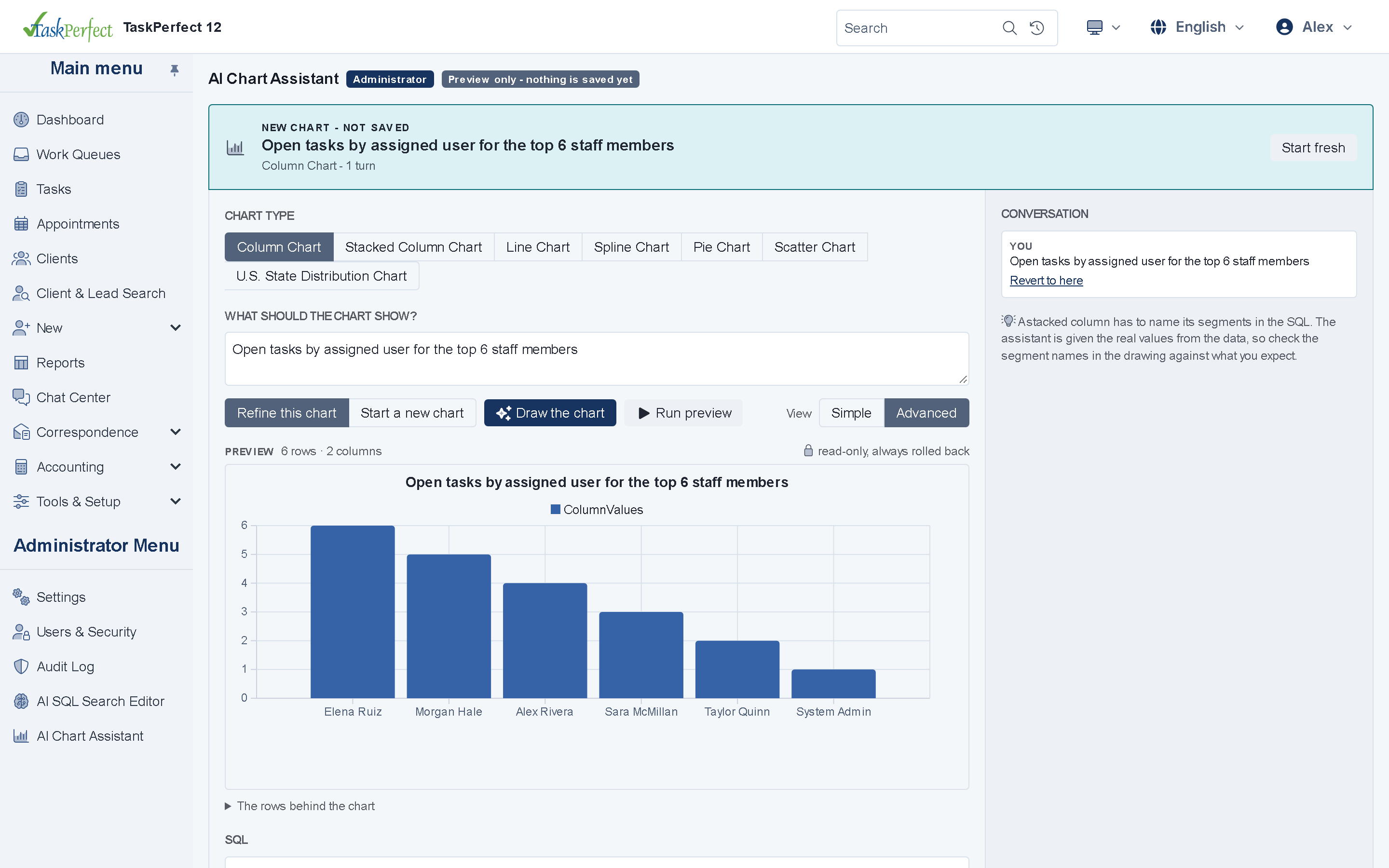
- Plain-English Queue & Chart BuildersAdministrators describe a work queue filter or dashboard chart in plain English, and Gemini drafts the configuration.
- AI Chat Assistant & Instant AnswersDraft grounded replies from your internal Knowledge Base and hand live conversations smoothly to staff.
- Document intelligence & call QAClassify, summarize and extract fields from uploaded PDFs, transcribe diarized call audio, and draft portal translations.
Documents, forms & reporting
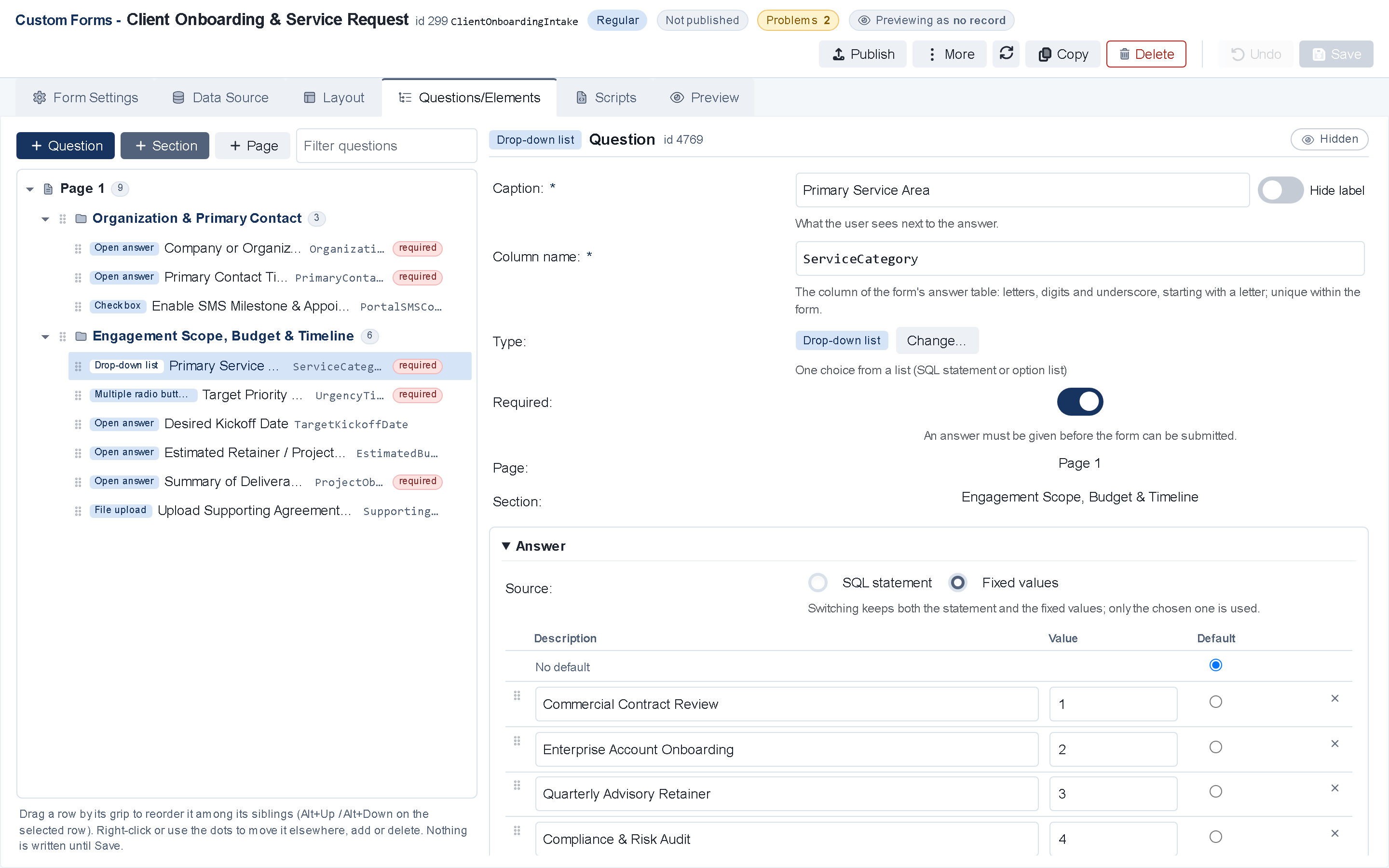
- Browser Form DesignerBuild multi-page conditional intake forms with formulas, public SMS OTP signup (
/start) and tokenized links (/apply). - Server-side Word-to-PDF conversionLibreOffice converts merged
.docxtemplates to PDF on the server—no Microsoft Word installation needed on the web server. - Web Document BatchesPreview, generate and send bulk letters or notices in the browser with live
My tasksprogress, ZIP print downloads and failure resends. - Dashboards by role & SSRS reportsStaff, team leads and executives see role-specific KPIs and open SQL Server Reporting Services reports as PDF or Excel.
Security, compliance & API
- Email & SMS two-factor sign-inProtect staff and portal logins with one-time verification codes, expiring temporary passwords and one-switch user disable.
- Field permissions & PII maskingControl access down to individual screens, actions and masked SSN, DOB or bank fields.
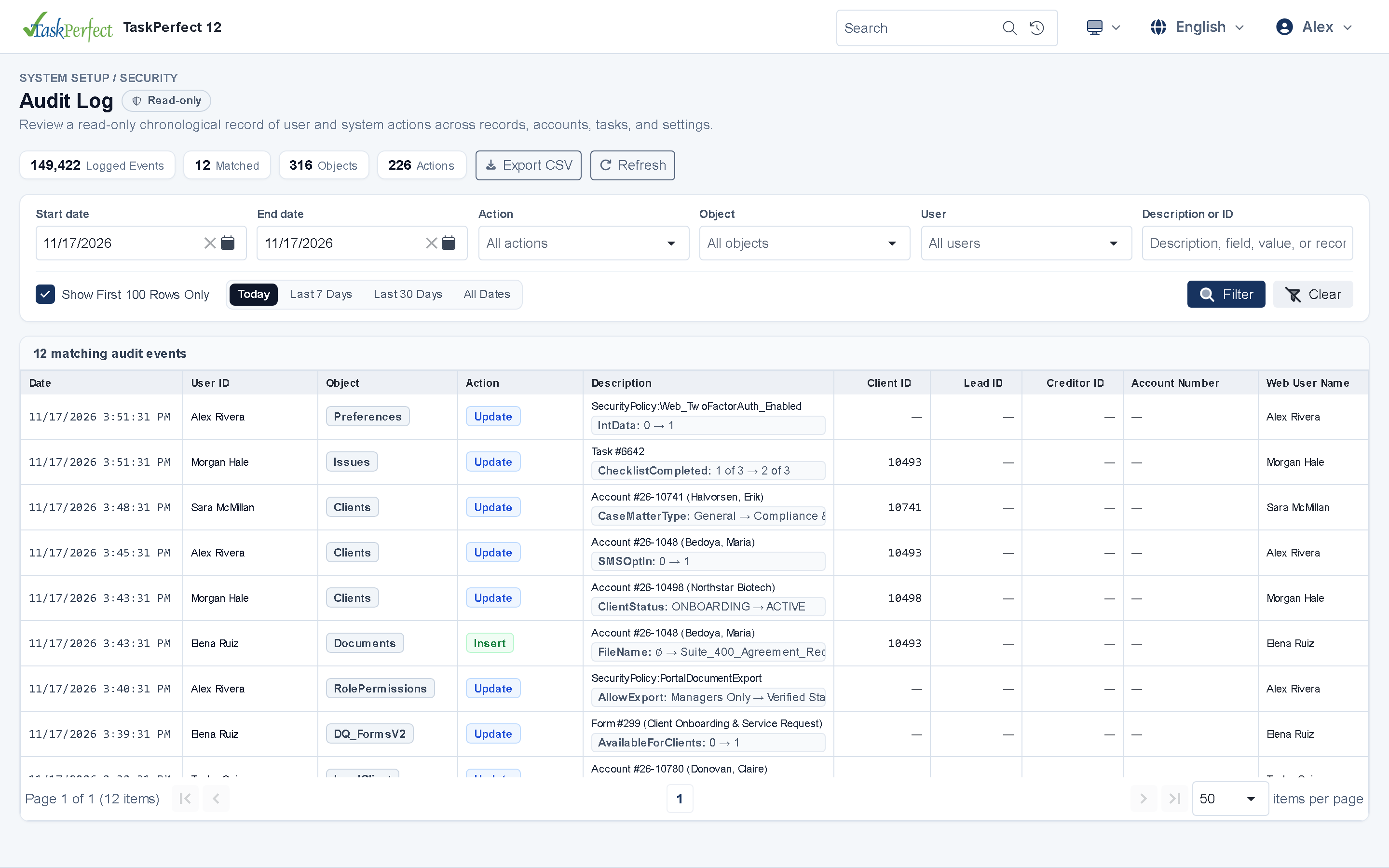
- Data & Settings Audit LogInspect who changed any record or system setting and when, with old/new values and automatic credential redaction.
- Data Retention PurgePreview and purge inactive lead or client records according to your retention rules directly from the browser.
- REST & SOAP Web Services APIConnect external vendors with per-vendor API accounts, 24-hour tokens, per-call permissions and no-code outbound webhooks.
See TaskPerfect 12 tailored to your workflows
A live 30-minute walkthrough covers your intake flow, documents, billing, client portal and hosting options.